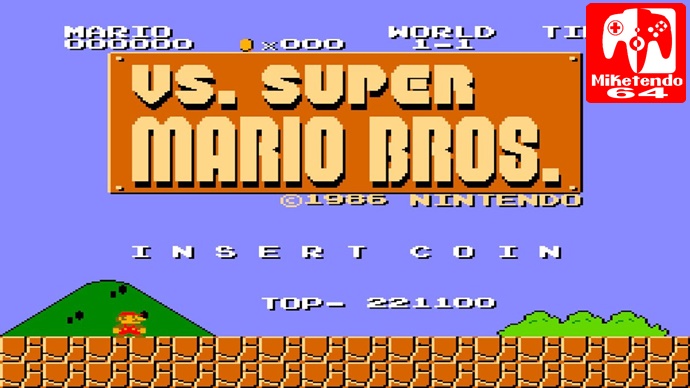
If you didn’t think the original Super Mario Bros was hard enough, well somebody heard you because VS. Super Mario Bros is a remix arcade version of the NES game you know and love with some very distinct changes with levels that came from Mario: The Lost Levels. You better have some nickels ready, cos you’re gonna need them.
VS Super Mario Bros. was released on the VS System. These were coin operated arcade machines that sprouted up during the 80’s and sometimes included seats or had you stand up to play. They were designed for competitive play and usually had two screens with joint controls and were mostly NES ported games like Wrecking Crew, Golf, Pinball and of course Super Mario Bros.
VS Super Mario Bros. plays just like the NES counterpart with a number of differences but the story is the same. As Mario or Luigi (2nd player only), you must rescue Princess Toadstool who has been captured by the evil King Koopa. You must collect coins and stomp Goombas as you make your way to the flagpole at the end of each level. Mushrooms help you grow and fire flowers give you the power to throw fire balls. Every power-up helps as a single touch of an enemy is enough to shrink you and kill you.
It isn’t just enemies you have to worry about though, environmental hazards are just as lethal as pit falls, lava pools and fire bars are just waiting for you to misjudge your jump and claim a life from you. If that wasn’t enough you have a countdown timer that should it run out before you reach the goal post, you will also lose a life.
Running on the same aesthetic as the NES version, VS. Super Mario Bros. uses 8-bit graphics and chiptunes. It looks and feels just like the original with all the sprites and sound effects, you would almost believe it to be the same game. Though there are a number of different levels that were never in the NES version and they can be an absolute nightmare to play. Fortunately, if you lose all your lives you can ‘Insert a coin’ and replay from the first level in the last World you lost all of your lives in.
The original screen ratio is 4:3 but thanks to the in-game display options, you can actually adjust the screen ratio and stretch the pixels to fill the full width of the screen. I don’t really like having plain black bars either side of my screen and at least with this option, I can play VS. Super Mario Bros. in full 16:9 beauty.
It isn’t just the screen you can adjust but a number of other options too, like how quick you want the timer to countdown. How many lives you can start with, the maximum being three. How many coins you have to collect before you can get an extra life with a minimum of 100. These weren’t just added for the sake of the Nintendo Switch. These were features that actually existed in the VS Arcade machines which operators could adjust in order to make the game as difficult as they like.
Much like VS Mario Bros., which we have reviewed before, VS. Super Mario Bros. also has three modes of play. The original mode. Hi Score mode in which your score will be recorded and shared online and then there is caravan mode which also shares your score online but you only have a 5 minute time limit in order to get as high a score as possible. The is no save option in Hi Score mode or Caravan mode but you do get a One time save option in original mode. This is handy for saving your game when you want to come back to it at a later date and won’t be affected if you close the software to play a different game. Unfortunately, you can not reuse this save point after loading from it and you will have to create a new save point the next time you want to quit the game.
The controls, much like the original game it is based on is very simple with the Joy-stick and/or directional buttons to move and two buttons for commands one for jumping and the other for dashing and throwing fire balls. You can also map the commands to other buttons to make it more comfortable to your style of gameplay. You can also map the Start button and Insert Coin button as well. There is one major problem with with the controls and that they are not as responsive as they could be and are too much like the original game. If the game was not hard enough with its crazy long jumps or influx of enemies on later levels. The player is also bogged down with a control scheme that can hinder them just as much as help them progress. If you don’t have enough speed, you can’t make the long jump. Sometimes your jump will fall short for no reason and even worse, you may even fail to jump entirely. This is nothing new though, this has been an existing fault in the games since it was first released on the NES.
It is incredible how Mario games have evolved over the years and how much of a challenge they used to be as opposed to how they have involved to become much more of an approachable platformer that anyone with half an idea can pick up and play. Still, With Nintendo yet to bring any of their original titles to the Nintendo Switch via Virtual Console. It is still nice that HAMSTER have stepped up to provide one of the most iconic games of all time that have inspired and moulded video games into what they are today. Even if you can’t beat through every level without having to keep adding continues, you can still test your skills against another player to see who is the better Mario Player as you can use two Joy-Cons to play 2-player.
Conclusion:
Well, what can I say? Other than it is Super Mario, yet again, it isn’t a title that offers much more to the Switch table that we haven’t already got already. That may seem harsh but it is worth noting that this title is around $6.99 to download on the Nintendo Switch eShop which is more than twice as much as the NES version on the Wii U or 3DS eShop. You can also play it on the NES Mini Classic if you are fortunate to have one or even via emulator on PC. Either of these versions also offer the option to save your game and reload from the restore point. I’m not saying that VS. Super Mario Bros is not worth the money, but when it is available for a much cheaper price on many other Nintendo platforms, you are better of buying another game for the Switch and continue to play Super Mario Bros on whatever platform you already have it on.
I am Chief Administrator for Miketendo64.com A news & reviews website for Nintendo related articles and merchandise. An intermediate gamer with over 20 years of experience spanning 4 decades and 4 generations of Nintendo Games Consoles From the NES up to the Wii U.
I also manage our YouTube Channel where I post videos frequently ranging from Let's Plays, Unboxings, Let's Talk Abouts, Our Wii U Lv1 Playthrough Series and the Super Mario Maker Bros Show! and a whole lot more, we even have our own Miketendo64 Directs!
You do have a valid point, our score does come across as harsh but as we have now started adding a word based Verdicts for our reviews, I shall go back and amend this one as it should be pleasant as opposed to “avoid”
Websites store cookies to enhance functionality and personalise your experience. You can manage your preferences, but blocking some cookies may impact site performance and services.
Essential cookies enable basic functions and are necessary for the proper function of the website.
Name
Description
Duration
Cookie Preferences
This cookie is used to store the user's cookie consent preferences.
30 days
These cookies are needed for adding comments on this website.
Name
Description
Duration
comment_author
Used to track the user across multiple sessions.
Session
comment_author_email
Used to track the user across multiple sessions.
Session
comment_author_url
Used to track the user across multiple sessions.
Session
Statistics cookies collect information anonymously. This information helps us understand how visitors use our website.
Google Analytics is a powerful tool that tracks and analyzes website traffic for informed marketing decisions.
Contains information related to marketing campaigns of the user. These are shared with Google AdWords / Google Ads when the Google Ads and Google Analytics accounts are linked together.
90 days
__utma
ID used to identify users and sessions
2 years after last activity
__utmt
Used to monitor number of Google Analytics server requests
10 minutes
__utmb
Used to distinguish new sessions and visits. This cookie is set when the GA.js javascript library is loaded and there is no existing __utmb cookie. The cookie is updated every time data is sent to the Google Analytics server.
30 minutes after last activity
__utmc
Used only with old Urchin versions of Google Analytics and not with GA.js. Was used to distinguish between new sessions and visits at the end of a session.
End of session (browser)
__utmz
Contains information about the traffic source or campaign that directed user to the website. The cookie is set when the GA.js javascript is loaded and updated when data is sent to the Google Anaytics server
6 months after last activity
__utmv
Contains custom information set by the web developer via the _setCustomVar method in Google Analytics. This cookie is updated every time new data is sent to the Google Analytics server.
2 years after last activity
__utmx
Used to determine whether a user is included in an A / B or Multivariate test.
18 months
_ga
ID used to identify users
2 years
_gali
Used by Google Analytics to determine which links on a page are being clicked
30 seconds
_ga_
ID used to identify users
2 years
_gid
ID used to identify users for 24 hours after last activity
24 hours
_gat
Used to monitor number of Google Analytics server requests when using Google Tag Manager




I agree that’s too expensive, but I would give a better note (6/7?) for historic reasons.
See ya!
You do have a valid point, our score does come across as harsh but as we have now started adding a word based Verdicts for our reviews, I shall go back and amend this one as it should be pleasant as opposed to “avoid”