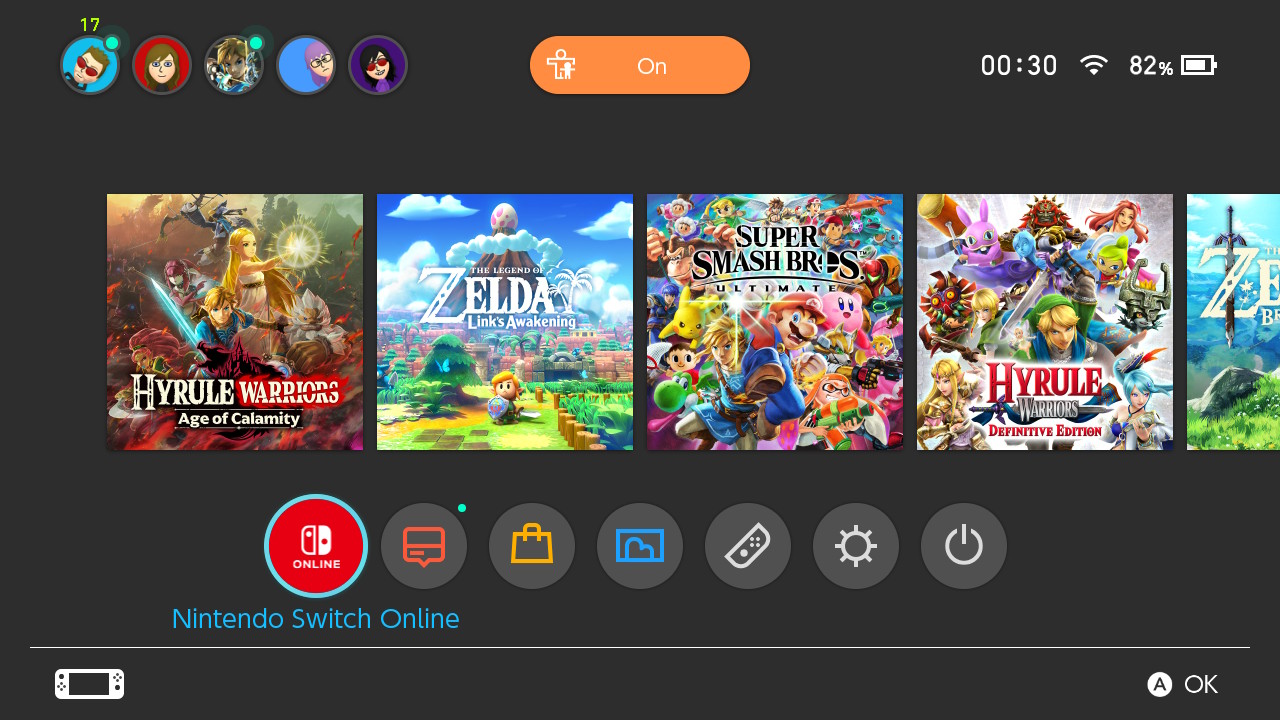
Time to hit update on your Nintendo Switch, Version 11.0.0 is available now and among a couple of new additions, the most notable is the fact that Nintendo Switch Online is now accessible from the Home menu. Full patch notes can be seen here:
Nintendo Switch Ver. 11.0.0 (Released November 30, 2020)
Nintendo Switch Online was added to the HOME Menu.
Access all Nintendo Switch Online services, from getting the latest information to checking your membership status. *This feature is not available in some countries/regions.
A new feature that automatically downloads backed up save data was added to the Save Data Cloud.
When using software with the same Nintendo Account linked to multiple systems, save data backed up from one console will automatically be downloaded to your other system(s). *To use this feature, it must be enabled under System Settings > Data Management > Save Data Cloud. *Save data will not be downloaded automatically unless save data for that software exists on the console. The first time only, users must download the save data manually. *A Nintendo Switch Online membership is required to use the Save Data Cloud service.
A new Trending feature was added to the User Page.
Users can check what software their friends are playing or have started playing recently. Information will not be displayed for friends who have their online status set to display to no one.
Users can now transfer screenshots and videos from Album to their smart devices.
Users can wirelessly connect their smart devices to Nintendo Switch to transfer the screenshots and videos saved within their Album.
For screenshots, users can transfer a maximum of 10 screenshots and 1 video capture at once. *To connect, users must use their smart device to scan the QR Code displayed on the Nintendo Switch screen. For more information, please refer to the Nintendo Support website. *“QR Code” is a registered trademark of DENSO WAVE INCORPORATED.
A new Copy to a Computer via USB Connection feature was added under System Settings > Data Management > Manage Screenshots and Videos.
Users can use a USB cable to connect Nintendo Switch to their computers to copy the screenshots and videos saved under Album. * A USB charging cable [model HAC-010] or a USB-IF certified USB cable that supports data transfer is required to connect to a computer. For more information, please refer to the Nintendo Support website. * Connection via the Nintendo Switch dock is not supported. Please connect the Nintendo Switch system directly to the computer.
Users can now select what download to prioritize when there are multiple downloads in progress.
When there are multiple software, update data, or downloadable content downloads in progress, users can now select which they want to download first.
You can set this under Download Options by selecting the icon for the software you want to download first on the HOME Menu.
User icons were added.
12 user icons that commemorate the 35th anniversary of the Super Mario Bros. series were added.
Brazilian Portuguese was added as a supported language.
When users set their region to the Americas and their language to Português, the language used on the HOME Menu and in certain software will be displayed in Brazilian Portuguese.
Several issues were fixed, and usability and stability were improved.
In 2015, when rumours of the NX and Zelda U were everywhere, my brother and I started Miketendo64 and we've been running it ever since. As the Editor-in-Chief, I have attended video gaming events in three different countries, been to preview events, and penned more than 4,000 articles to date, ranging from news, to features, reviews, interviews and guides. I love gaming and I love all things Nintendo. I also love Networking, so don't be afaid to reach out.
Email: contact@miketendo64.com / jack.lo@miketendo64.com
Website: https://miketendo64.com/
YouTube channel: https://www.youtube.com/channel/UCyVMO4QgcniAjhLxoyc9n8Q
Websites store cookies to enhance functionality and personalise your experience. You can manage your preferences, but blocking some cookies may impact site performance and services.
Essential cookies enable basic functions and are necessary for the proper function of the website.
Name
Description
Duration
Cookie Preferences
This cookie is used to store the user's cookie consent preferences.
30 days
These cookies are needed for adding comments on this website.
Name
Description
Duration
comment_author
Used to track the user across multiple sessions.
Session
comment_author_email
Used to track the user across multiple sessions.
Session
comment_author_url
Used to track the user across multiple sessions.
Session
Statistics cookies collect information anonymously. This information helps us understand how visitors use our website.
Google Analytics is a powerful tool that tracks and analyzes website traffic for informed marketing decisions.
Used to distinguish new sessions and visits. This cookie is set when the GA.js javascript library is loaded and there is no existing __utmb cookie. The cookie is updated every time data is sent to the Google Analytics server.
30 minutes after last activity
__utmc
Used only with old Urchin versions of Google Analytics and not with GA.js. Was used to distinguish between new sessions and visits at the end of a session.
End of session (browser)
__utmz
Contains information about the traffic source or campaign that directed user to the website. The cookie is set when the GA.js javascript is loaded and updated when data is sent to the Google Anaytics server
6 months after last activity
__utmv
Contains custom information set by the web developer via the _setCustomVar method in Google Analytics. This cookie is updated every time new data is sent to the Google Analytics server.
2 years after last activity
__utmx
Used to determine whether a user is included in an A / B or Multivariate test.
18 months
_ga
ID used to identify users
2 years
_gali
Used by Google Analytics to determine which links on a page are being clicked
30 seconds
_ga_
ID used to identify users
2 years
_gid
ID used to identify users for 24 hours after last activity
24 hours
_gat
Used to monitor number of Google Analytics server requests when using Google Tag Manager
1 minute
_gac_
Contains information related to marketing campaigns of the user. These are shared with Google AdWords / Google Ads when the Google Ads and Google Analytics accounts are linked together.
90 days
__utma
ID used to identify users and sessions
2 years after last activity
__utmt
Used to monitor number of Google Analytics server requests