

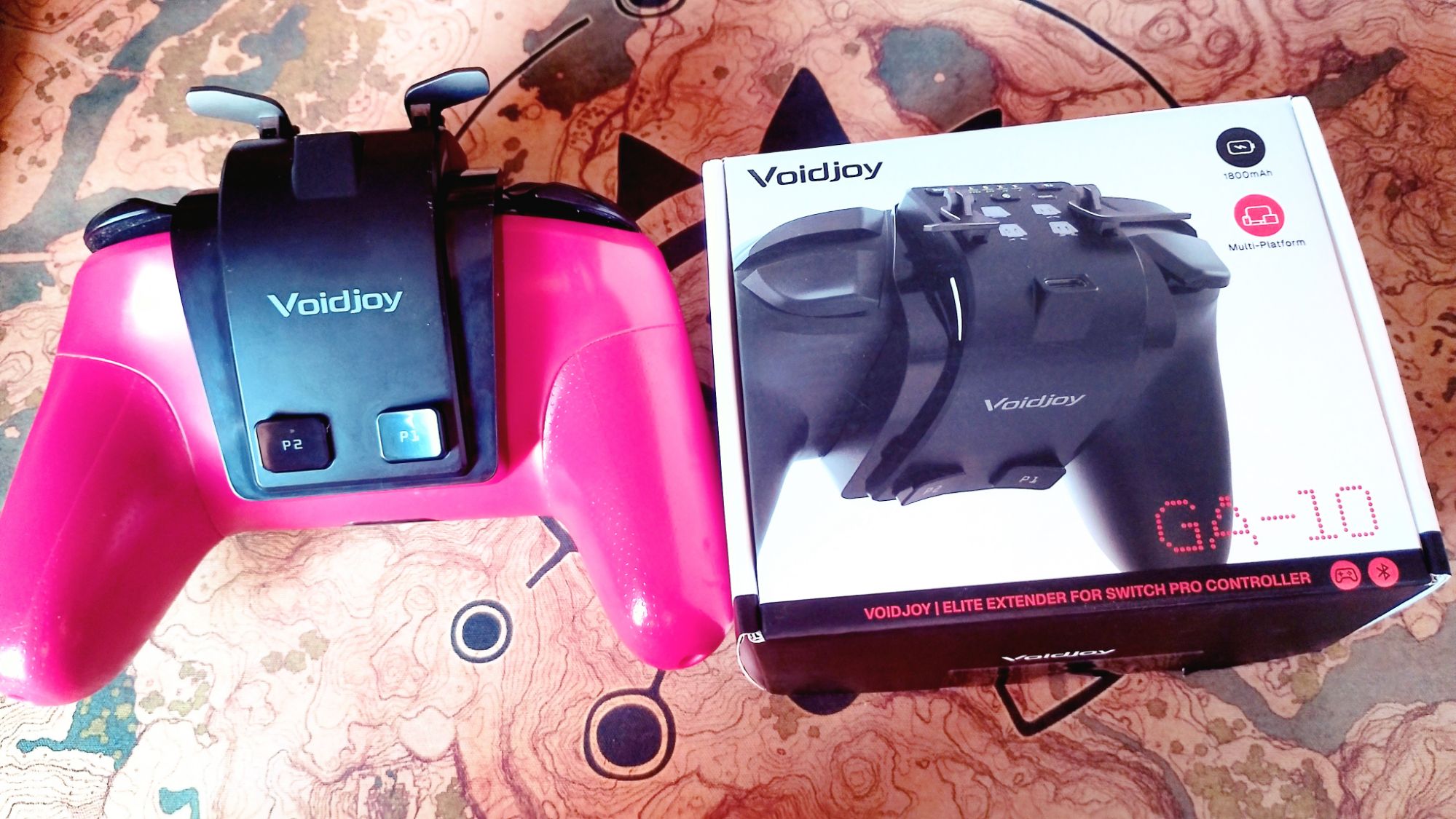
Have you ever wanted to get more oomph with your Nintendo Switch Pro Controller? Maybe you want extra buttons, analog triggers, macro support, and more battery life? Well, JSAUX may have just the thing, and that is the Voidjoy GA-10 Elite Extender for the Nintendo Switch Pro Controller. It is an attachment that clips onto the back of your Switch controller via the USB-C port. It has all of the aforementioned features and works with the Nintendo Switch and PC.
Before we get straight on with the review, we just wanted to thank JSAUX and Jaleo PR for sending us a unit to review for our website. With that out of the way, lets get on with the product review.

Aesthetics – Voidjoy GA-10 Elite Extender
The Voidjoy GA-10 Elite Extender for Nintendo Switch Pro Controller is an interesting concept in that it adds more functionality to an already existing piece of hardware. From an aesthetic standpoint, the design is simple and sleek enough that little protrudes over the top of the controller. The trade-off, though, is that it is much bulkier from behind due to the battery. It also adds an extra 68 g or so to the weight you will be holding while playing games. This isn’t a huge downside, as the 1800 mAh battery will grant you another 50+ hours more of gaming time.
The Elite Extender has little in the way of protrusions, with the exception of the analog triggers that is. These triggers are removable so you can reattach them in reverse, which is useful for storing the controller and reduces the risk of losing them. They are also held in place with small magnets so they can’t be easily dislodged.

Functionality – Voidjoy GA-10 Elite Extender
In terms of functionality, the Voidjoy GA-10 Elite Extender does have some appealing features. The two additional buttons on the back are programmable to any of the Switch Pro Controller’s buttons. This can be handy for dedicating a button to sprinting, for example, or another action that makes whatever you are playing that little bit easier. The Elite Extender’s Macro support allows you to register whole button combo configurations to the back buttons. You can then administer full combos with a simple press of a button, making it a very useful feature when playing fighting games.
The two analog triggers are best utilized for games that require that little extra precision, like the GameCube games on NSO. As for actual Switch games, though, there isn’t going to be much use for them as most of them don’t support analog triggers. There are a number of PC games that are compatible with analog controllers, and the Voidjoy GA-10 Elite Extender can connect to your PC so you can use your Switch Pro Controller to play Steam games and the like. It can also pair up with Tablets, smartphones, and TVs as well.
The Elite Extender, while it is connected to your Pro Controller, is actually recognised as a different controller. If you remove it from the Pro Controller it is connected to, the Pro Controller will sync up to your Switch as it normally does. So, for example, if you have the Elite Extender paired up with your PC, you can remove it from the Pro Controller and still use the controller on Switch as well. It has dedicated buttons for pairing on the top of the controller and a passthrough button over the sync button, so you can sync it to your Nintendo Switch.
Also, due to the fact that it connects to the Pro Controller via its USB-C port, the Voidjoy GA-10 Elite Extender has its own USB-C port that you can connect to when you want to charge the controller and the attachment at the same time. After all, if you are going to be using the attachment a lot, you don’t want to be removing it every time you want to charge the controller. It makes more sense for it to have its own charging point to make up for occupying the one on the Pro Controller.

Practical But Impractical
Okay, so after talking about its good points, it is time to look at the faults of the Voidjoy GA-10 Elite Extender. On paper and on first impressions, it does exactly what it says on the tin (or packaging). It extends the battery life of the Pro Controller, it has additional buttons, and it works with both Switch and PC. That is great, and I really wish I could just stop there and call it a day. However, this is a product review, and I need to look at the downsides to the Elite Extender, and for every good point, there is an equally bad one.
- The Analog Triggers: Most of the Nintendo Switch game library has no requirement for analog triggers, with the exception of the GameCube games on NSO, which you need to have an active Nintendo Switch Online + Expansion Pack Subscription to use.
- The Back Buttons: They are a welcome addition, but are located at such an odd position that they are difficult to reach unless you have long fingers. The buttons are on the bulk of the Elite Extender, meaning you will have to overreach every time you want to press the button. It is particularly inconvenient when playing an intensive fighting game where split-second actions are the difference between winning and losing. You can waste time fumbling to find the back buttons, time that you could have used inputting the combo manually.
- Syncing Up The Elite Extender: It should be a straightforward process, but it requires an extra step before you can sync your Switch controller to your console while using the device. Rather than just simply pressing the sync button on your controller, you need to make sure that the controller is turned off first; then you have to turn the Extender on with its own power button and press and hold the Bluetooth button until the yellow lights on the controller flash. This then puts the controller into pairing mode so you can finally pair up the controller. Fortunately, you only have to do this once, as the extender will now connect to the Switch/PC/Tablet/Smartphone/TV from that point on.
- Switch Pro Controller Only: For now, it will only work with first-party and some third-party Switch Pro Controllers. If you were planning to use this on Switch 2 or with a Switch 2 Pro Controller, then you would be out of luck. Primarily, I could not get it to sync up with the controller for the life of me. Secondly, the Switch 2 Pro Controller has its own programmable back buttons that are much more comfortable to reach. Thirdly, the Elite Extender doesn’t sit as snugly on the back of the Switch 2 Pro Controller due to the slightly different positioning of the USB-C port on the controller.
- Won’t Be Coming To Europe Anytime Soon: Due to replacement battery regulations being applied in Europe, JSAUX Gaming has no plans to release the attachment in the territory as it does not comply with the regulations. The EU law stipulates that electronic devices must now have user-serviceable batteries, and the Elite Extender only has an integrated battery unit.

Conclusion – Voidjoy GA-10 Elite Extender
It is bittersweet to say that while the Voidjoy GA-10 Elite Extender is a great idea to turn your Pro Controller into an elite pad, with additional buttons and battery power, it is only going to appeal to a niche market of gamers. Yeah, it can give your Nintendo Switch Pro Controller some additional functionality and squeeze a bit more life out of the nine-year-old controller, but is that really a big selling point? A lot of people are starting to move on from the Switch and now own a Switch 2. Sure, you can use the Switch Pro Controller with the Switch 2, but it is hard to justify the $39.99 price point for an attachment you are going to get very little value for on the Switch anyway.
If you are planning to use your Switch Pro Controller on PC, Tablets and Smartphones instead, then the Voidjoy GA-10 Elite Extender may be an avenue you wish to consider. I, for one, will not get the most benefit out of it, as I play most of my games on Switch 2 with a Switch 2 Pro Controller, but maybe you might if you think the Voidjoy GA-10 Elite Extender could be a good fit for you.
Share this:

Discover more from
Subscribe to get the latest posts sent to your email.