

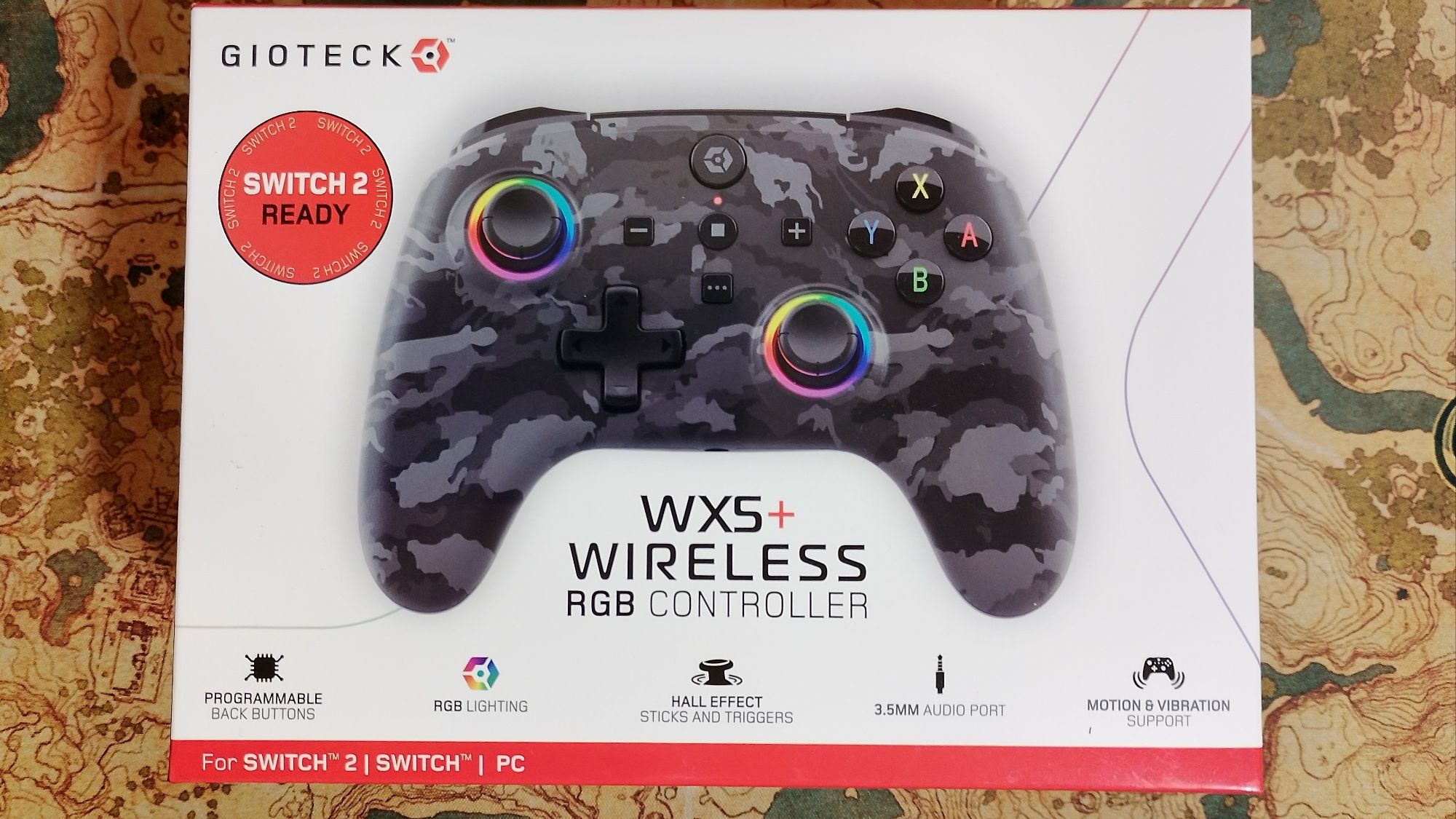
Product Reviewed: WX5+ Wireless RGB Controller
Manufacturer: Gioteck
Version Reviewed: Dark Camo
Retail Price: £24.99 / €29.99
We are back with another product review, and this time, it is Gioteck’s WX5+ Wireless RGB Controller. We have reviewed several products for Gioteck in the past, including the WX-4 Wireless Controller, but this time, we will be putting the new controller to the test to see how it improves on the previous model and whether it has what it takes to compete with Nintendo’s own Pro Controller for Nintendo Switch 2.

Appearances and Features:
Gioteck has released some interesting controller design shapes, such as the WX-4 controller. This time around, though, they have opted for a neutral shape that is more akin to the Nintendo Switch and Nintendo Switch 2 Pro Controllers. As for the designs and color schemes of the controllers themselves, there are four new patterns: Dark Camo, Pink Swirl, Doodle, and Crayons. While Gioteck may not have the licensing permissions to stick Super Mario, The Legend of Zelda, or other household video game branding on their controllers, the actual designs Gioteck went for themselves are actually pretty sleek and eye-catching enough without relying on being plastered with Mario’s face to look cool.
The WX5+ Wireless RGB Controller can be used with both the Nintendo Switch and the Nintendo Switch 2 consoles, as well as with a PC via Bluetooth. It comes with two programmable buttons on the back, just like the Switch 2 Pro Controller, and even has a shortcut button on the face of the controller dedicated to the Game Chat feature on NS2. However, you can also reprogram this as any other button on the controller if you do not want to use it for Game Chat.
Gyro Controls and rumble are also implemented into the controller, with the latter being adjustable by pushing the capture button with either the up or down button on the D-pad to adjust the intensity. This is handy for some games that may use rumble excessively, or you just want to dial it down a notch to help extend battery life.
At the bottom of the controller, there is a 3.5 mm audio jack where you can plug in a headset. This is ideal for when you want to play while chatting with friends, but the slight drawback is that it can only be used when the controller is wired up to the Switch Dock via a USB-A to USB-C cable that comes with the controller. Alternatively, you can also use a USB-C to USB-C cable to connect the controller to the Switch 2 console itself to hear audio that way, but then again, if you are that close to your console in tabletop mode or handheld mode, you may as well plug your headphones into the Switch 2 directly.
As for other features that the WX5+ Wireless RGB Controller possesses and what else is contained in the product box, they are as follows.
- Wireless Connection Bluetooth 5.0 + EDR
- Programmable back buttons
- Hall Effect sticks and triggers
- Standard button layout
- RGB Lighting
- LEDs for power and player number
- Motion & Vibration support (Gyro & Rumble)
- 3.5mm Audio Port
- Turbo feature
- 1m USB Charge cable
- User Manual


Charging and Battery Time:
Charging the WX5+ Wireless RGB Controller can be done using the provided USB-A to USB-C cable or with any cable that has a USB-C connector. You can plug it straight into any USB port or power source that is capable of charging, like the Switch dock or a USB A/C adapter. Third-party controller chargers can also be used to charge up the controller, provided the USB-C port aligns properly with the connector.
While the controller will take about two hours to charge, you may only get about six hours of gameplay when in wireless mode. This can vary, of course, due to the RGB lighting, vibration intensity, or other features that may be in use (like turbo button use).

Connecting to your Switch:
Connecting the WX5+ Wireless RGB Controller to the Nintendo Switch or Nintendo Switch 2 is quite straightforward, but it does have a process that you need to follow. There isn’t a sync button you need to press, but rather two buttons in unison that will make the controller visible for the console to pair up to it, and it only really needs to be done once on initial setup. The official steps are as follows:
- On the home screen, go to Controllers in the options bar below, and select Change Grip/Order.
- Press and hold the Home and Y buttons simultaneously for 4 seconds to enter pairing mode. The status LED will blink rapidly, and the controller will automatically connect.
- After establishing a successful connection, the console displays the controller as user 1/2/3/,4, and the status LED will stop blinking.
Should you have any problems connecting your controller to the Nintendo Switch, it may be a firmware issue, and you will have to get in touch with Gioteck support or download the necessary firmware update from their website. Please note that it might be more helpful to get in touch with support first before downloading any firmware updates, as they might be able to help you connect the controller to the console without the need for an update.

Performance and Gameplay:
I will just come out and say that I find the performance of the WX5+ Wireless RGB Controller to be very much on par with that of the Nintendo Switch Pro Controller. The buttons and the joysticks are incredibly responsive, and there is very little input lag, if any. To test this out, I played a selection of different games like Donkey Kong Bananza, Mario Kart World, Towa and the Guardians of the Sacred Tree, and Street Fighter 6 on the Nintendo Switch 2. The controller handled every input with ease and is quite comfortable to hold. The indentations in the joysticks make it easy for your thumbs to rest on top, and the face buttons are a decent size and easily identifiable.
The controller does have a sleep saver feature that, when it has not detected button inputs for more than five minutes or so, it will turn itself off. You can turn it back on easily, though, by pressing the Home button for a few seconds to power it back on again.
CONCLUSION:
In all my years of gaming, there are have been few third-party controllers that I have opted to use over the official first-party one. That said, the WX5+ Wireless RGB Controller has more than pleasantly surprised me and I will more than happily use it over the Nintendo Switch 2 Pro Controller. Not only is it affordable, but it is actually quite robust and doesn’t feel like a cheap alternative, at all. In fact, it is a logical alternative that you can purchase three of for the price of a Pro Controller and still get a quality gaming experience from it. So much so, that I never picked up the Nintendo Switch 2 Pro Controller as I already had several Pro Controllers for the original Switch and now, I don’t even use them.
The WX5+ Wireless RGB Controller has all the features I need to play games with and although it doesn’t have an NFC reader for amiibo functionality, it is not exactly a deal breaker either seeing as it can already do everything else a pro controller can do and at a price that won’t break the bank. I do wish it supported Bluetooth Audio though. That is my only real criticism for the controller.
THE VERDICT:
Recommended
*Products were provided by Gioteck for the purposes of this review

Share this:

Discover more from
Subscribe to get the latest posts sent to your email.