

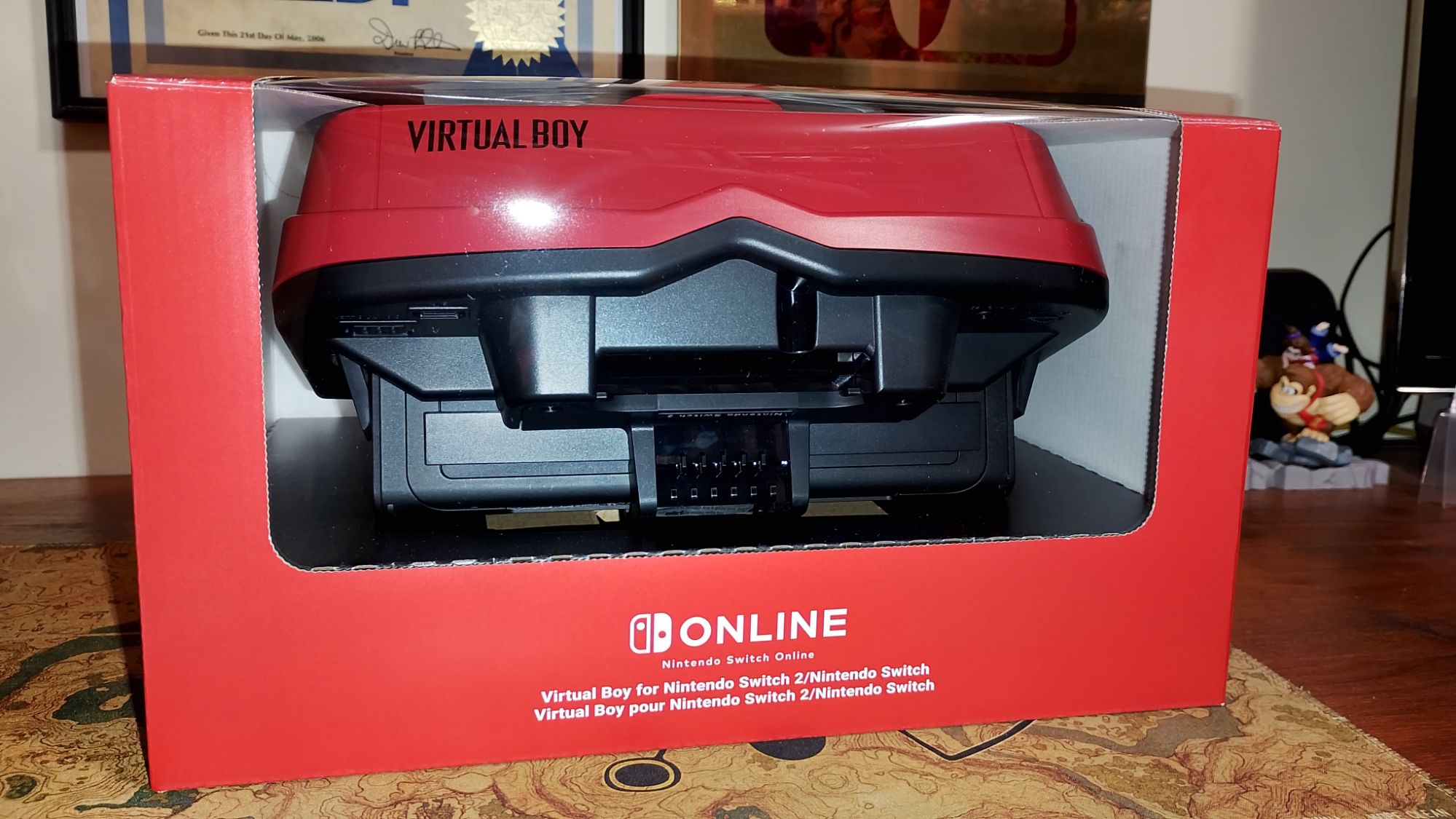
Product Reviewed: Virtual Boy Accessory For Nintendo Switch & Switch 2
Manufacturer: Nintendo
Retail Price: £66.99 / €79.99
Welcome back for another product review! It’s time to make eyes bleed and see red as we play VR like it’s 1995. Nintendo has released a new accessory that works with both the Nintendo Switch and Nintendo Switch 2. The accessory in question is a replica of sorts of the infamous Virtual Boy, a known commercial failure that some have considered to be ahead of its time. With that in mind, Nintendo has deemed that now is its time as they expand the Nintendo Switch Online library of games to include the Virtual Boy’s catalogue. Having never owned the original Virtual Boy, I was eager to pick up the Virtual Boy accessory to see how it fares and whether the bad press was justified, or perhaps it was just misunderstood.
Now, in order to play the Virtual Boy games on Nintendo Switch and Nintendo Switch 2, you would first need to have an active Nintendo Switch Online + Expansion Pack subscription, as well as a dedicated accessory in which to play the games with. Now, there are actually two kinds of peripherals that are compatible with the Virtual Boy games, and that is the aforementioned Virtual Boy accessory and the Virtual Boy-themed Nintendo Labo cardboard visor. For the sake of this review, we will be solely focusing on the Virtual Boy accessory and not the Labo Cardboard visor.

Appearances and Features:
The Virtual Boy accessory for Nintendo Switch and Nintendo Switch 2 is essentially a near-perfect replica of the original system that was released in 1995. At a glance, both the OG system and the accessory look identical, with the exception that the accessory is slightly larger and for good reason. The original Virtual Boy had its own hardware built in, whereas the 2026 accessory utilises the Nintendo Switch and Nintendo Switch 2 console to reproduce the games by housing the systems within the casing. The top of the accessory opens up so you can sit your Switch console inside.
The accessory itself comes in two parts that connect via a clamp. There is the headset, which is the main bulk of the peripheral, and the bipod stand that the headset rests upon. Just underneath the clamp between the headset and the stand is a bezel that you can use to adjust the vertical angle of the headset so you can position it to where you are most comfortable when using the Virtual Boy.
I should point out that, although you can use the Nintendo Switch, Switch OLED, and Switch 2 with the Virtual Boy accessory, only the Switch can be used with it straight out of the box. If you don’t have a Switch 2, but do own a Switch or Switch OLED, you will need to change a small bracket at the bottom of the headset with the Switch-compatible bracket that is included in the box. You will need a Phillips Screwdriver to swap the brackets, but it is a rather simple procedure and won’t take up too much time.

On closer inspection of the Virtual Boy accessory, you can see that there are a couple of switches and buttons on the accessory that are purely cosmetic and do not move. On the original Virtual Boy, these would be used to adjust the IPD (Interpupillary Distance) and focus. At the bottom of the accessory, you can even see little motifs that depict the volume wheel, audio jack port, the EXT port and the controller port. A lot of attention went into capturing every little detail of the original Virtual Boy. I will say, though, that if the audio port actually worked, it would have been ideal for using headphones to aid in the immersion.
There is another feature to the Virtual Boy, and that is the interchangeable colour filter lenses. By default, the accessory comes with red filters to match those of the original system, which helps correct the colours that you see on the Switch screen. These lenses can be removed and replaced with other colour filters like Yellow or Green (to be sold separately at a later date). You can also use the system without the colour filters and just use the standard lenses, which are more appropriate for playing other select VR-compatible games (more on these in a bit).


Performance and Gameplay:
The main selling point of the Virtual Boy accessory for Nintendo Switch / Nintendo Switch 2 is the games you can play on it. Granted, the Virtual Boy library is actually quite limited, with Nintendo only making seven of them available right now as part of the NSO – Virtual Boy Classics, and the promise of more games being released in the near future. What little is available, I will admit, actually plays reasonably well, even with a standard pair of Joy-Con or a Pro controller. I should note that while the original Virtual Boy did in fact have its own controller, the accessory for Switch and Switch 2 is sorely missing.
You can use it with virtually any form of Switch-compatible controller, although it has been recommended by a few individuals online that the N64 wireless controller from Nintendo works quite well. This is due to its button layout being close enough to that of the Virtual Boy’s controller, as you can use the C-buttons as a second D-pad, with some clever remapping.
As for the games themselves, I am rather pleased with how the Virtual Boy accessory replicates the experience of playing these games. The added benefit of being able to adjust the IPD and the size of the screens within the Virtual Boy Classics app is a welcome feature, and I didn’t feel nauseous at all when playing through the current library of games. Pinball, Wario Land, Red Alarm and Teleroboxer handled very well, and The Mansion of Innsmouth was much more immersive than I was expecting it to be. On the whole, I am impressed with the ingenuity of the Virtual Boy accessory and how it replicates the original system.
Now that I had played the intended library of games, I decided to branch out and try some other games that were VR compatible. The games in question are Nintendo’s first-party titles for the Nintendo Switch: Super Mario Odyssey, Captain Toad: Treasure Tracker, The Legend of Zelda: Breath of the Wild, Super Smash Bros. Ultimate, and Nintendo Labo VR Kit. Except for the Labo VR kit, all of the other games received DLC that added special VR modes to them when the Nintendo Labo VR Kit was released. Due to the nature of the Labo VR kit, you would hold the headset up to your face with the Joy-Con controllers connected to the Switch inside the headset. By doing so, you could use the console’s gyro controls to look around freely in a 3D virtual space.
The Virtual Boy accessory, however, is designed to be played from a stationary position. This means that some of these VR Labo compatible games are not fully compatible with the accessory. The Super Mario Odyssey VR mode can’t be played as intended, as you need to be able to move the Virtual Boy around freely in a 3D space. Super Smash Bros. Ultimate is also a no-go, as that game requires the Joy-Con to be attached to the console to play it in VR Mode. You can select a stage and choose the ruleset, but when it comes to selecting a character and actually fighting, no chance. Spectating a full-on CPU match is possible; however, you will need to physically pick up the Virtual Boy Accessory so you can follow the fight as it moves around the stage.
Captain Toad: Treasure Tracker’s VR Mode can technically be played with the Virtual Boy, at least for the first three stages, with some adjustments, as you can use the right joystick to move the camera on a horizontal plane. The last stage is unfortunately not possible, as you need to literally look up and down to hit the targets in the on-rails mine cart stage. The Legend of Zelda: Breath of the Wild is surprisingly the easiest game to play. It has full camera movement assigned to the right Joystick and can conveniently be played from a stationary position. Nintendo Labo VR Kit is a bit of a mixed bag, as some of the mini-games can be played with the Virtual Boy Accessory reasonably well. Other mini-games, though, do need the freedom of movement to see all around you, as well as require certain other accessories to play them. That said, you do have the extra benefit of Nintendo Labo VR Kit’s Labo VR Garage, where you can make your own VR games that can then work with the Virtual Boy in mind.
CONCLUSION:
I’ll be honest, the Virtual Boy Accessory for Nintendo Switch / Nintendo Switch 2 is still very much a niche product. It relies heavily on nostalgia for the OG console and toys with the emotions of those who may never had one and wanted to experience it for themselves. I myself fall into this category and while I have tried it a couple of times at video game conventions, I have always wanted to try and own a piece of this technology so I could add it to my ever growing collection of Nintendo consoles. The accessory itself is very well made and I am satisfied with the finished product.
Sure, I do wish that the Virtual Boy games could have actually been included with the console itself much like the NES and SNES Mini Classic consoles, or at the very list, came with a download code for a standalone collection on the Nintendo eShop. With the games instead being part of the Nintendo Switch Online library, it does feel like you have to get through two paywalls; one being NSO and the other, purchasing the accessory, in order to play these games. Sure, you could opt for the cheaper cardboard Labo headset, or perhaps a third-party peripheral, but you will still need to pay out for the privilege.
All in all, though, as a collector’s item and a novelty product, I can comfortably recommend picking up the Virtual Boy for Nintendo Switch / Nintendo Switch 2. It is certainly the most ideal way for playing the Virtual Boy games on the NSO if you have any interest in playing them and for the Zelda BOTW VR mode to be actually playable now is a huge win. The price tag is admittedly on the high side for something that has no hardware or circuitry whatsoever, but when you have the likes of LEGO charging an arm and a leg for replicas of our favourite childhood memories, it seems to be par for the course for those of us who want to hold on to our youth that little bit longer.
THE VERDICT:
Recommended
*Product was purchased from the My Nintendo Store for the purposes of this review.
Share this:

Discover more from
Subscribe to get the latest posts sent to your email.