

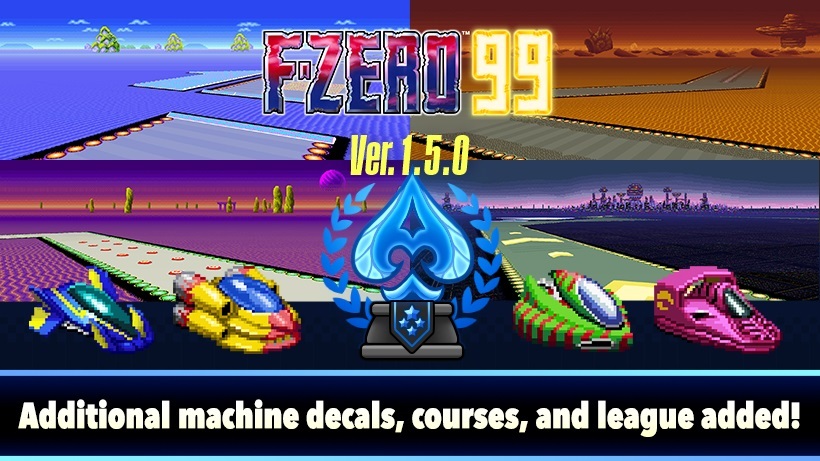
Even more tracks to race on!
A new sizable update has just been released for F-ZERO 99, and this time around, version 1.5.0 has plenty to offer, including five new tracks, an anniversary event and so much more. For the complete patch notes covering all new additions and changes, we have them here:
F-ZERO 99 | Ver. 1.5.0 Patch Notes: (Released October 1, 2024)
New Additions:
- We have added five tracks (MUTE CITY IV, SAND STORM I, BIG BLUE II, SAND STORM II, SILENCE II) from the Ace League of the BS F-ZERO GRAND PRIX game, which was distributed exclusively on the Super Famicom satellite broadcast adapter known as Satellaview. Grand Prix Ace League has also been added.
- The new tracks have been adjusted for F-ZERO 99.
- Practice Mode has been expanded so that you can practice by unlocking the Ace League tracks.
- A Grand Prix Ace League tab has been added to the leaderboard.
- Ace League track information has been added to TRACKS and PRIX under Records in the Workshop.
- If you complete the Grand Prix Ace League, you will receive a decal with the motif of a BS F-ZERO GRAND PRIX machine.
- A one-year anniversary event will be held. A total of 12 anniversary badges, backdrops, borders, and emotes have been prepared. During the event, if you match at least one Lucky Rank (updated daily), you can obtain one of the one-year anniversary rewards. If you collect all 12 of them, you’ll unlock a bonus decal for each machine.
- The one-year anniversary event will be held for a limited time only. During the event, Ace League tracks will appear more frequently. You can press the L Button on the Main Menu to check the status of one-year anniversary rewards and how much time is remaining in the event.
- One-year anniversary rewards that could not be obtained during the event period can be obtained from regular Lucky Ranks after the event ends. Unlock requirements for bonus decals will also remain in place.
- If you obtain all the one-year anniversary items during the event period, you will revert to regular Lucky Rank rewards.
- Any Bounty Chips from Lucky Ranks you earned before the event will be retained, and by returning to regular Lucky Ranks, you can pick up where you left off.
- As part of the one-year anniversary celebration, players will receive four new remotes as a gift when launching the game.
- Added the ability for players to set which emotes they want to enable, and added a function where they will be automatically displayed at specific times.
- You can set which emotes to display by going to the Workshop menu and selecting EMOTES.
- You can now also set emotes to automatically display when you KO another pilot, crash out, or finish a race.
- In addition to one-year anniversary rewards, new boost colors and Spin Effects have been added to customize your machine. New backdrops, badges, and borders have also been added for Pilot Card customization. All of these can be unlocked when certain conditions are met.
- One default decal, four backdrops, and four borders will be added upon completion of the F-ZERO 25 training. These will automatically be added for players who have already completed the F-ZERO 25 training.
- The new boost colors and Spin Effects can only be obtained through limited-time challenges. Press the L Button on the Main Menu for the Challenge Highlights screen where you can check limited-time challenges.
- You can check acquisition conditions and equip new items by selecting MACHINES or PILOT CARDS from the Workshop menu.
Other Adjustments and Changes:
- The training flow has been revised so that Practice and Workshop are unlocked sequentially while the game content of F-ZERO 99 is explained to first-time players. Also, it’s now possible to restart training at any time by selecting Replay Training from Options.
- You can now choose team colors from Team Battle in a Private Lobby.
- A new bar has been added to the top of the Main Menu that shows your skill rating and how far you are from the next level.
- A screen showing a list of machines and Pilot Cards has been added to the Workshop.
- Move the cursor over MACHINES or PILOT CARDS under Workshop and press the Y Button to display the screen.
- Boost colors and Spin Effects can now be previewed by selecting Machines from the Workshop menu.
- Adjusted Balance of Machines
Machine Adjustments WILD GOOSE
- Increased maximum Boost speed
FIRE STINGRAY
- Increased maximum Boost speed
- Increased maximum speed when driving on dash plate
- Decreased amount of power needed for Boost
- Reduced the amount of damage received and the amount of repulsion when colliding with other machines.
- Made adjustments to WILD GOOSE because, while it performed well in races with more participants, it struggled in races with fewer participants.
- Made adjustments to FIRE STINGRAY because it tends to lose power easily in situations where machines are crowded together, and due to the high cost of Boost and low recovery in the Pit Area, it tends to perform worse than other machines in races with a large number of participants.
- In order to reduce situations where you are hit from behind by a Bumper after the Bumper has crossed a dash plate, we reduced the speed of the Bumper coming off the dash plate.
- The number of wins displayed above other players’ machines is now hidden on the lobby screen for players who have never won a race.
- The EXP and tickets awarded for Lucky Rank matches have been adjusted to give more EXP and tickets.
- The bonus ticket obtained by logging in once a day has been eliminated. In conjunction with this change, the daily bonus for completing F-ZERO 99, Pro Tracks, Classic, and Team Battle was revised from 250 points to 500 points.
- In Pilot Card customization, certain badges that reflect the number of times an action like Boost or spin has been achieved can now be set on a Pilot Card to show all the badges that you have acquired.
Other Issues:
- Fixed an issue where limited-time challenges weren’t being updated.
- Fixed other minor issues to make for a more pleasant gaming experience.
About F-ZERO 99:
Ready…go! – Lightning-fast F-ZERO racing with a 99-player twist
Line up with 98 other F-ZERO machines and race to the finish in this thrilling take on the original Super NES™ game. Keep an eye on your power meter as you boost and bash, because speed is just as important as survival. Defend yourself with a Spin Attack and collect Super Sparks to breeze past the competition on the elevated Skyway. The F-ZERO 99 game is available only to active Nintendo Switch Online members.
MASTER THE MODES – Outpace and outlive your opponents in rotating modes
The core F-ZERO 99 mode is just one way to race at breakneck speeds. Mini Prix and Grand Prix modes appear on a set schedule and challenge you to compete and qualify in a series of races. Team Battle and the extra-tough Pro Tracks mode rotate throughout the day. Prepare yourself in Practice Mode and race against your ghost.
CHOOSE YOUR MACHINE – Complete challenges for even more customization
Boost your Skill Rating by excelling in races and take on challenges to unlock customization options. Make your F-ZERO machine your own with alternate colors, decals, and boost effects. Complete achievements in your Pilot Card and receive different unlockable backdrops and display badges.
PLAY IT OLD SCHOOL! – Enjoy classic F-ZERO action the way it’s meant to be played—using a full-size Super Nintendo Entertainment System style controller!
EVEN MORE TRACKS – Queen League and King League available now!
Two additional leagues have been added to Grand Prix mode. Both Queen League and King League are now available to play, each with their own set of tracks!
Queen League:
- Mute City II
- Port Town I
- Red Canyon I
- White Land II (Grand Prix only)
- Death Wind II (Pro Tracks and Mini Prix only)
King League:
- Mute City III
- Fire Field (Grand Prix only)
- Red Canyon II (Pro Tracks and Mini Prix only)
Source: Nintendo
Share this:

Discover more from
Subscribe to get the latest posts sent to your email.