


Physical media, with a catch.
During today’s very informative Nintendo Switch 2 Nintendo Direct, we learned a great number of things. For starters, in terms of Nintendo Switch 2 cartridges, we’ve learned they are the same size as Switch 1 cartridges, but are now red in colour, but we’ve also learned something else about them. Not only will there be Switch 2 cartridges, but there will also be something called Game Key-Cards, which is something you’re going to want to know about.
With the likes of Switch 1 already having physical releases where you buy a game box and inside is a download code, with Game Key-Cards, they are a cartridge you will be able to insert into your Nintendo Switch 2 and then have to download your game via the internet.
For even more on this matter, here’s Nintendo with their official overview:
Nintendo Switch 2 Game-Key Card Overview:
Game-key cards are different from regular game cards, because they don’t contain the full game data. Instead, the game-key card is your “key” to downloading the full game to your system via the internet.After it’s downloaded, you can play the game by inserting the game-key card into your system and starting it up like a standard physical game card.
Here’s what game-key card packaging looks like:
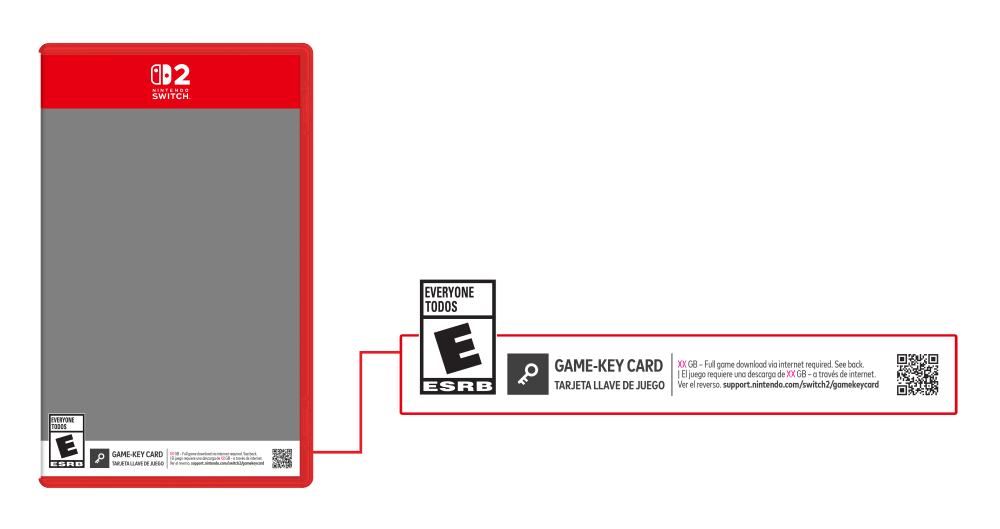
How it works:
Step 1: Insert the game-key card into the system.
Step 2: Download the game.
The game itself isn’t included on the game-key card, so you’ll have to download it before you can play.
When you insert the game-key card, further instructions will be displayed on the HOME Menu. Please follow the instructions to download the game.
Please note: to download the game, you must have enough free space in your Nintendo Switch 2 system memory or microSD Express card. The amount of free space required is indicated on the game-key card packaging.
Step 3: Play the game.
Once the game is downloaded, you’re ready to play!
An internet connection is only required when you launch the game for the first time. After this, the game can be started even without an internet connection. However, like regular physical software, the game-key card must be inserted into the system in order to play the game.

Source: Nintendo
Physical media, with a catch.
During today’s very informative Nintendo Switch 2 Nintendo Direct, we learned a great number of things. For starters, in terms of Nintendo Switch 2 cartridges, we’ve learned they are the same size as Switch 1 cartridges, but are now red in colour, but we’ve also learned something else about them. Not only will there be Switch 2 cartridges, but there will also be something called Game Key-Cards, which is something you’re going to want to know about.
With the likes of Switch 1 already having physical releases where you buy a game box and inside is a download code, with Game Key-Cards, they are a cartridge you will be able to insert into your Nintendo Switch 2 and then have to download your game via the internet.
For even more on this matter, here’s Nintendo with their official overview:
Nintendo Switch 2 Game-Key Card Overview:
Game-key cards are different from regular game cards, because they don’t contain the full game data. Instead, the game-key card is your “key” to downloading the full game to your system via the internet.After it’s downloaded, you can play the game by inserting the game-key card into your system and starting it up like a standard physical game card.
Here’s what game-key card packaging looks like:
How it works:
Step 1: Insert the game-key card into the system.
Step 2: Download the game.
The game itself isn’t included on the game-key card, so you’ll have to download it before you can play.
When you insert the game-key card, further instructions will be displayed on the HOME Menu. Please follow the instructions to download the game.
Please note: to download the game, you must have enough free space in your Nintendo Switch 2 system memory or microSD Express card. The amount of free space required is indicated on the game-key card packaging.
Step 3: Play the game.
Once the game is downloaded, you’re ready to play!
An internet connection is only required when you launch the game for the first time. After this, the game can be started even without an internet connection. However, like regular physical software, the game-key card must be inserted into the system in order to play the game.
Source: Nintendo
